_edited.png)
How Far Should I Sit From Screens? A Complete Guide for Healthy Eyes
Updated: Jun 11
Screens have become a major part of modern life. Whether you are working on a laptop, watching television, attending online classes, or scrolling through your smartphone, your eyes spend hours focusing on digital devices every day. Because of this, many people experience tired eyes, headaches, dryness, and blurred vision after long screen use One of the most important factors that affects eye comfort is screen distance. Sitting too close or too far from a screen can place unnecessary strain on the eyes and even affect posture and concentration. Understanding the ideal viewing distance for different devices can help reduce eye strain and support healthier vision habits.
Why Screen Distance Matters
Your eyes constantly adjust focus while looking at digital screens. When a screen is too close, the eye muscles work harder to maintain clear vision. Over time, this can lead to digital eye strain, a common condition caused by prolonged screen exposure Incorrect screen distance may also reduce blinking, which increases dryness and irritation. Many people also lean forward or squint while using screens, causing neck and shoulder discomfort along with visual fatigue Maintaining a comfortable viewing distance allows the eyes to relax and function more naturally
How Far Should You Sit From a Computer Screen?
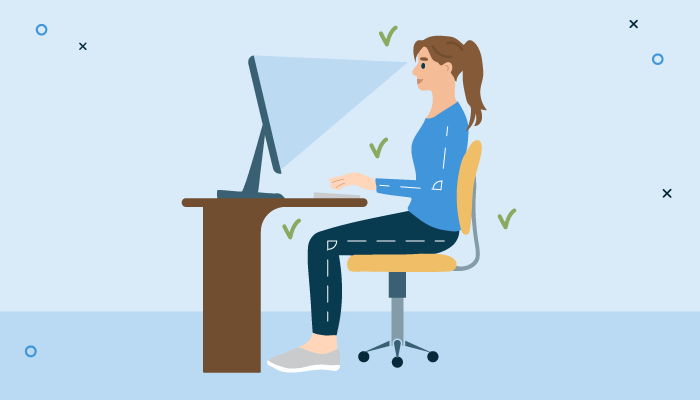
For desktop computers and laptops, experts generally recommend sitting about 20 to 28 inches away from the screen, which is roughly an arm’s length distance. This position allows the eyes to focus comfortably without excessive strain The screen should also sit slightly below eye level. Looking slightly downward is more natural for the eyes and helps reduce dryness because the eyelids cover more of the eye surface If the text appears too small, many people unconsciously move closer to the screen. Increasing font size instead of leaning forward can improve comfort and reduce eye fatigue
Problems Caused by Sitting Too Close to a Computer
When a computer screen is placed too close to the face, the eyes must work harder to maintain focus. This often leads to:
Eye strain
Headaches
Dry eyes
Blurred vision
Difficulty concentrating
People who work on computers for long hours may notice these symptoms becoming worse by the end of the day.
How Far Should You Sit From a Television?
The ideal distance from a television depends on the screen size. In general, sitting about 1.5 to 2.5 times the diagonal width of the TV screen provides comfortable viewing For example, a medium-sized television is usually best viewed from several feet away rather than sitting directly in front of it. Larger TVs require more distance to maintain comfortable viewing and reduce strain on the eyes Modern high-definition televisions allow clearer viewing from closer distances, but sitting extremely close for long periods can still make the eyes feel tired
Can Watching TV Too Closely Damage Your Eyes?
Watching television from a close distance does not usually cause permanent eye damage. However, if someone consistently prefers sitting very close to the TV, it may indicate an underlying vision problem such as nearsightedness Children who frequently move close to screens may benefit from a professional eye examination
What Is the Best Distance for Smartphones?
Smartphones are often held much closer to the eyes than any other screen. Ideally, phones should be kept around 16 to 18 inches away from the face whenever possible Holding a phone too close for long periods increases focusing effort and may cause:
Eye fatigue
Dryness
Headaches
Neck pain
Temporary blurred vision
Using phones in dark rooms can make the problem worse because the eyes must constantly adjust between bright light from the screen and the darker surroundings.
Why Screens Cause Eye Strain
Digital screens require continuous focus and attention. Unlike printed paper, screen text may appear less sharp because of pixels, glare, and brightness variations. People also blink less while using digital devices, which contributes to dryness and irritation Extended screen use can lead to a condition known as digital eye strain or computer vision syndrome. Common symptoms include tired eyes, burning sensation, blurry vision, headaches, and trouble focusing The risk becomes higher when people spend several uninterrupted hours looking at screens without breaks
The Importance of the 20-20-20 Rule
One of the simplest ways to reduce screen-related eye strain is by following the 20-20-20 rule. Every 20 minutes, look at something about 20 feet away for at least 20 seconds This habit helps relax the eye muscles that remain focused on nearby screens for long periods. Taking short visual breaks throughout the day can improve comfort and reduce fatigue.
How to Make Screen Viewing More Comfortable
Creating a healthy screen setup can significantly improve eye comfort. The room should have balanced lighting to reduce glare and reflections on the screen. Extremely bright or dark surroundings can force the eyes to work harder It is also important to blink regularly while using devices. Many people blink less during screen use, which causes dryness. Keeping screens clean and adjusting brightness levels can also improve viewing comfort Maintaining proper posture is equally important. Sitting upright and keeping screens at a comfortable distance can help prevent neck and shoulder strain along with visual fatigue.
How Screen Distance Affects Children
Children today spend more time than ever using digital devices for education and entertainment. Because their eyes are still developing, healthy screen habits are especially important Parents should encourage children to maintain a proper distance from screens, take regular breaks, and avoid excessive screen time. If a child frequently squints, rubs their eyes, or sits very close to devices, an eye examination may be necessary Early detection of vision problems can help support healthy visual development and learning.
When Should You Visit an Eye Doctor?
Occasional tired eyes after screen use are common, but persistent symptoms should not be ignored. You should consult an eye specialist if you regularly experience headaches, blurred vision, dry eyes, dizziness, or difficulty focusing after using digital devices Routine eye examinations are important for detecting vision changes and ensuring that glasses or contact lens prescriptions remain accurate
Conclusion
Sitting at the correct distance from screens plays an important role in maintaining eye comfort and reducing digital eye strain. Computers should generally remain about an arm’s length away, televisions should be viewed from a comfortable distance based on screen size, and smartphones should not be held too close to the eyes Healthy screen habits, regular breaks, and proper posture can make a significant difference in protecting your vision. As screen time continues to increase in daily life, taking care of your eyes has become more important than ever
If you want to know more details contact us:+91 96 25 90 3017


Comments